The cabgo_my_mcp_usage log generated by Cabgo's server records two dimensions that most operators never read together. The first is the content: which tool the agent used, with what parameters, which tenant, and what result. The second is the origin channel: which client sent that call. Claude Desktop, the ChatGPT plugin, the MCP web client, a script someone on the team pointed directly at the API. When a single operator uses the agent from a single client, that second dimension is irrelevant. When three team members access from different clients, the channel distribution reveals something no dashboard screen shows: how each team member actually works with the platform, and whether the client each person chose is configured to produce consistent results.
The thesis of this article is that the channel distribution isn't a technical backend metric with no operational value — it's a diagnosis of the real state of agent adoption across your team. Teams that use three different channels for the same tasks almost always have silent errors in at least one of them: calls arriving without an explicit tenantId and using the token default without warning, sessions that mix context from two different apps, prompts that work in Claude Desktop but return inconsistent results in ChatGPT because system instructions aren't synchronized across clients. Reading that distribution once a month takes under ten minutes with the agent and lets you distinguish between a team accessing from multiple channels deliberately and one doing it without coordination.
What the channel field in cabgo_my_mcp_usage actually records
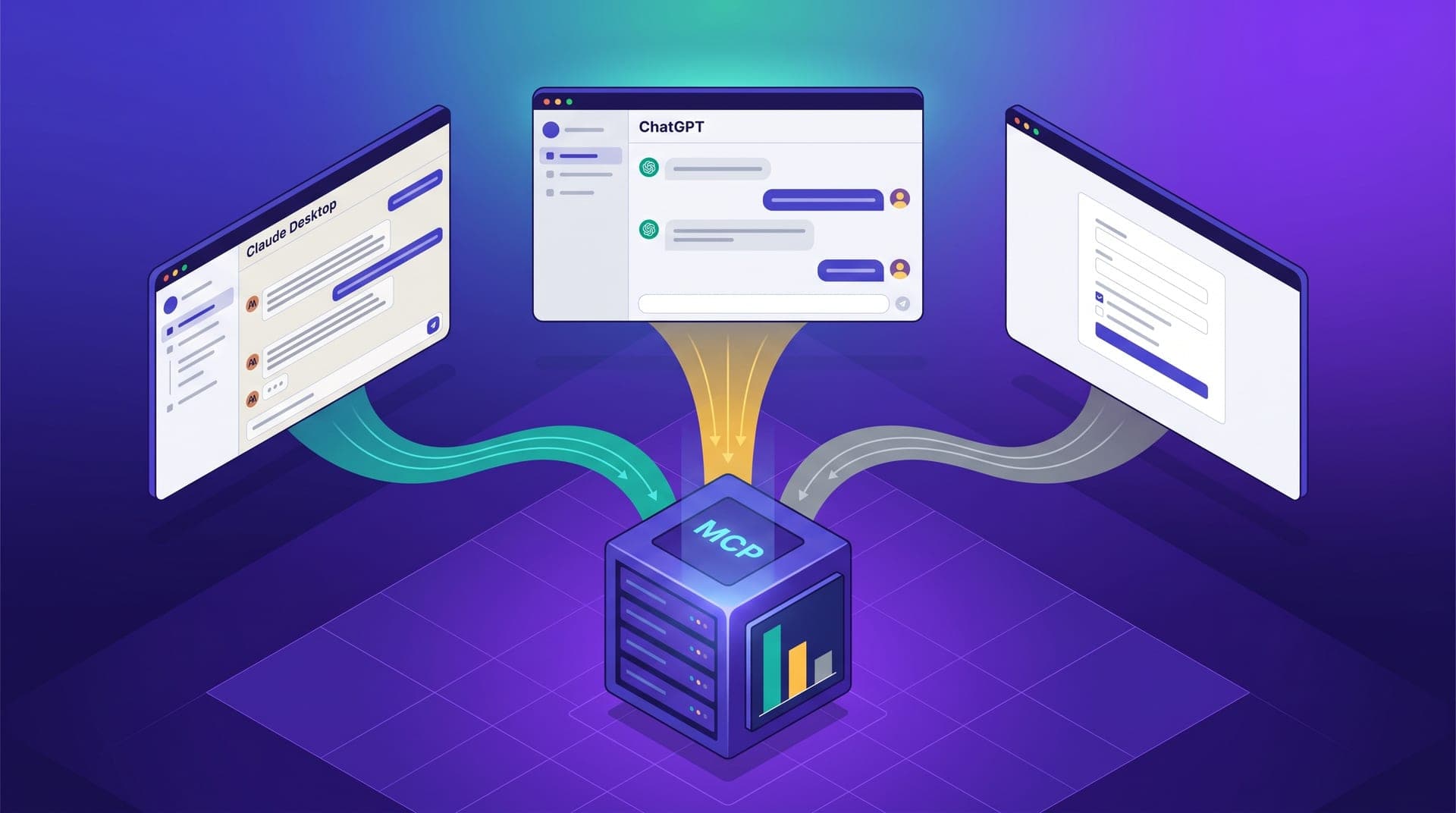
Every call arriving at Cabgo's MCP server includes a client identifier in the request header. That identifier is recorded in cabgo_my_mcp_usage alongside the tenantId, the tool invoked, the timestamp, and the response status. The channel field — which appears in the log as client_id — takes values like claude_desktop, chatgpt_plugin, web_client, or the custom identifier an automation script sends when authenticating. In the usage history view the agent returns when you request an audit, that field is available on every record and can be grouped, filtered, and compared against the rest of the call's fields.
What this means in practice is concrete: when the agent queries the list of active drivers, the server knows whether that request came from the long session the shift coordinator has open in Claude Desktop, from the plugin the business owner uses in ChatGPT for a quick metric check from their phone, or from the script the analytics team has set up to export the monthly close. The log doesn't evaluate whether the channel is right for the task — it records the channel and lets the monthly distribution tell the story of how the team actually accesses operational data.
Three channels with three distinct usage patterns
In operations where more than one team member accesses the agent, the channel distribution after a month of use tends to reflect three user types with distinct access habits. Understanding these isn't an academic segmentation exercise — it's the foundation for knowing which channel has what level of configuration and where silent errors are most likely to appear.
- **Claude Desktop as the long-session channel**: the user who opens the chat at shift start and keeps it active for two or three hours, accumulating context. Calls from this channel usually carry the correct tenantId because the operator invested in configuring the system instructions. It's the channel with the lowest silent-error rate in operations that have been running the agent for more than two months.
- **ChatGPT as the quick-query channel**: shorter, more frequent calls, with higher configuration variability across users. It's the channel chosen by team members who didn't set up the agent deeply but want a specific data point fast. Access convenience is high; the consistency of preloaded context varies by user and is rarely verified.
- **Web client or direct API as the automation channel**: scripts and scheduled flows that call the server on fixed schedules — the nightly report, the month-close metrics export, the demand-peak webhook. These calls almost always carry the correct tenantId because it's hardcoded in the script, but they rarely appear in the operator's review because they're treated as automatic and nobody audits them regularly.
The three distribution patterns that emerge after the first month
After a month of operation with more than one active user, the channel distribution in the log tends to fall into one of three patterns. Each has different implications for the quality of data the team is getting from the server — and for how much synchronization work remains to be done.
- **High concentration in one channel (70–90% from Claude Desktop)**: a signal that a central operator uses the agent intensively while the rest of the team hasn't yet adopted agent access. Normal in the first three to six months of use. The opportunity here is extension: when the team starts accessing too, the channel already working well is the configuration model to replicate across any clients they add.
- **Dual distribution (Claude Desktop and ChatGPT in similar proportions)**: almost always indicates two active users with different task types — the primary operator running long Desktop sessions and a second team member making short ChatGPT queries. The risk in this pattern is configuration asymmetry: if Desktop has the right context loaded and ChatGPT doesn't, half the calls arrive at the server without the frame that produces consistent data.
- **Fragmented distribution (three or more channels in similar proportions)**: the signal that multiple team members are accessing without a shared configuration convention. This is the pattern where silent tenant errors and data inconsistencies appear most frequently — the kind that reach support as 'unexpected behavior' tickets that nobody can reproduce in the next shift.
Hidden friction: when a context-free channel introduces errors nobody traces to the source
The channel most prone to silent errors isn't the one used least — it's the one with the most variation in how different team members configured it. In practice, that's almost always the ChatGPT plugin. The reason is structural: configuring system instructions in ChatGPT requires a deliberate per-user action — opening profile settings, writing the operation's context, including the tenantId for the relevant role. When different team members have separate ChatGPT accounts, each has their own system instructions, or none at all. There's no mechanism that propagates configuration from one profile to another.
The most common result in operations where three or more people use the agent: the primary coordinator has the tenantId and operation thresholds correctly loaded in their profile instructions; the second coordinator, who started using the plugin two weeks later, never configured theirs. The second coordinator's calls arrive at the server without an explicit tenantId, the server uses the authentication token's default, and if that default doesn't match the tenant they're working with at that moment, the data returned belongs to the wrong app. The output looks correct — a clean table, reasonable numbers — and nobody questions it until a metric doesn't match what the app is showing. By then, several shift decisions have already been made using the wrong tenant's data.
When to standardize the channel and when to standardize the context instead
The intuitive answer to fragmented distribution is to standardize on a single channel. That works when all team members have the same type of task with the agent. In a regional operation with a shift coordinator, a supervisor, and the business owner, all three have different needs: the coordinator needs long sessions with accumulated context; the supervisor needs quick access to specific metrics from wherever they are; the business owner needs the daily summary without technical friction. Forcing all three to use the same client doesn't solve the problem — it just moves the friction to whichever user's workflow doesn't fit the standard channel.
The more effective alternative isn't standardizing the channel — it's standardizing the context. If every active client in the team carries the same system instructions — the correct tenantId for each role, the operation's normal thresholds, the escalation criteria — the specific channel stops being the variable that determines consistency. Calls from any channel arrive at the server with the frame that produces correct data. The channel distribution in the monthly log then becomes the verification indicator: if 85% or more of calls arrive with the correct tenantId regardless of channel, the context is well replicated. If a channel has more than 30% of calls resolved by the token default instead of the prompt, someone on the team is working without preloaded context — and that's the concrete adjustment needed, not the channel itself.
The channel audit: how to read the distribution in ten minutes
Reading the channel distribution requires no direct backend access or special platform reports. The agent can generate the analysis with a call to the cabgo_my_mcp_usage history and a well-structured prompt. The first time you run this analysis, the goal is to identify three things: which channels are active, which has the highest rate of calls without an explicit tenantId, and whether that rate corresponds to a specific user or is spread across several. That's enough to determine whether there's a pending configuration adjustment or whether the current distribution is deliberate and consistent.
The analysis that prompt returns is straightforward to interpret. A channel with 90% explicitly-tenanted calls indicates a solid configuration in the client using it. A channel with 40% explicit tenant indicates that whoever uses it works without context most of the time — not intentionally, but because the system instructions were never completed or became outdated when the operation changed its tenant or expanded to a new city. The follow-up adjustment is always the same: sync the context of the underperforming channel with what already works in the primary channel. That work takes five to fifteen minutes per client, depending on how many context fields need to be copied from the original instructions.
I ran the channel analysis for the first time after four months of having the agent active. The result surprised me: 38% of the calls were coming from my coordinator's ChatGPT, without the system instructions I had configured in my Claude Desktop. She didn't know her access was context-free — she just noticed that sometimes the data didn't match what she saw in the app. When we reviewed it together and synced her configuration, that 38% of tenant-less calls disappeared within a week.
The channel distribution in cabgo_my_mcp_usage isn't a technical backend metric — it's the real state of how the team accesses the agent. A team where every active client carries the same context produces consistent results regardless of which channel each member prefers. A team where configuration was only replicated in the primary operator's client has a source of silent errors in secondary channels that nobody traces to the channel until it appears in the monthly distribution — or in a support ticket with symptoms that can't be reproduced.
The concrete action after reading the channel distribution isn't changing which client each team member uses — it's verifying that system instructions are synchronized across all active clients. If the log shows 30% of calls resolved by the token default from the ChatGPT plugin, that percentage has a direct solution: open the profile settings for that user in that client and add the context that already works in the primary channel. No migration needed, no habit changes required. Just ensure that the channel each person already uses arrives at the server with the same frame that produces correct data. The following month's distribution confirms whether the adjustment worked.